
Data Literacy/ Data & Insights for Business Decisions EPA Guide | by Cuomu Zhaxi
When you’re coming up to your End Point Assessment (EPA), it can feel like there are a lot of different threads to keep hold of. Read on to start untangling them.
DL/Data & Insights for Business Decisions EPA Fundamentals
The End Point Assessment (EPA) is the final assessment for the Data Technician Apprenticeship qualification. It enables you to showcase your knowledge, skills and behaviours in accordance with the Data Technician Level 3 requirements.
The EPA is carried out by an external assessor nominated by an independent End Point Assessment Organisation (EPAO) – Accelerate People. You can find more information about the assessor and assessment methods on their Information page for Level 3 Data Technician Apprenticeship EPA.
Two Assessment Methods:
- AM1 Scenario Demonstrations with questioning: two Exercises each taking 45 mins (approx 2 hours including break)
- AM2 Professional Discussion Underpinned by the Portfolio (1 hour)
You need to pass both assessment methods to pass the EPA. To achieve a Distinction grade, you need to obtain distinction in both assessments.
Golden Files:
The Data Literacy/ Data & Insights for Business Decisions EPA assessment plan is based on the Golden File - Data Technician Standard set out by Institute for Apprenticeship & Technical Education (IATE). The Standard is designed to accommodate a wide range of apprentices from different organisations and industries. Multiverse has adapted the Standard and created a more accessible version (download it here).
The first step for EPA preparation is to understand what knowledge, skills and behaviours you must demonstrate. Familiarising with these KSBs also allows you to gain an overview of the industrial standard for a Data Technician and identify areas for development.
- Knowledge: Information, technical detail, and ‘know-how.’
- Skills: Practical application of knowledge.
- Behaviours: Mindsets, attitudes or approaches needed for competence.
You can take a keyword approach to familiarise yourself with these KSBs. For example, data source for K2 “How to access and extract data from a range of already identified sources” and “technical documentation” for S11 “Produce clear and consistent technical documentation using standard organisational templates”.
The grading criteria for the EPA is developed based on the KSBs. There are different Grading Criteria for AM1 and AM2. If you’d like to have a detailed look at how KSBs are used by assessors, take a look at this End-point assessment plan for Data Technician apprenticeship standard.
EPA is your Data Literacy/ Data & Insights for Business Decisions “Bake off”! The difference is that everybody gets to be the star baker!
DL/Data & Insights for Business Decisions EPA is a bit like the Great British Bake Off when it’s the show time:
- You need to follow a given recipe and use provided ingredients (datasets) to complete a technical challenge, and judges will ask you questions about how and why you make certain choices (Scenario Demonstration).
- You need to design and complete a Show Stopper (portfolio) and discuss your approach with the judges to convince them of your bakery knowledge and skills (Professional Discussion).
Yes, it can get intense, but the good news is:
- You can narrow down your recipe by choosing a scenario
- You have 13 months to prepare your Show Stopper (portfolio), and you are graded on your discussion with the assessor, not on the portfolio directly
- You have only 1 judge (assessor) to convince
DL/Data & Insights for Business Decisions EPA Prepping Map
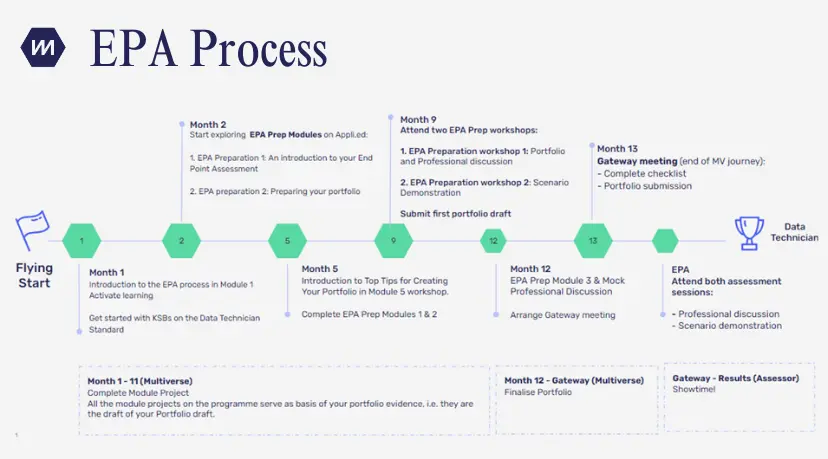
Key milestones:
- After Flying Start: Review the EPA essentials in the Welcome to the Programme Module; Get started with checking the Data Technician Standard and KSBs on IfATE website
- Month 1 Onwards: Complete your monthly written Projects to gradually build up your portfolio; attend group coaching sessions to enhance your communication skills to prepare for Professional Discussion
- Month 2: Start exploring the EPA Assessment Method Guide Module to familiarise yourself with KSBs and grading criteria
- Month 5: Complete Module 5 Scenario Demonstration Practice Project
- Month 7: Complete Module 7 Scenario Demonstration Practice Project
- Month 8: Complete Module 8 Scenario Demonstration Practice Project
- Month 10: Attend EPA Portfolio and Professional Discussion Prep workshops Month 10 (or at a time agreed with your coach): Submit your first portfolio draft using the Portfolio Builder
- Month 12: Complete the Final EPA Prep Module
- Month 13: Complete Gateway meeting - mark the end of the Multiverse journey and book assessment day(s)
- Post-Gateway Meeting (usually within 3 weeks): EPA Assessments
EPA Tips
Writing Up Your Portfolio:
- Review the recording of this Portfolio Readiness Session for best practices and things to avoid
- MUST HAVE - Evidence: The portfolio includes sufficient, authentic, relevant, current and consistent evidence for Data Gathering, Data analysis and Validation, Distribution and Dissemination, Approach to work
- Structure: Following the project brief to ensure your portfolio has an overall logical structure and flow
- Presentation: The portfolio is overall well presented
- Remove all guiding questions used in the project task briefs (you can also rename your projects with personalised titles within 5 words)
- No piece of information you put in is too simple or basic (e.g. explicitly explain the file extension when discussing data format such as “I retrieved a.cvs/.xlsx file from …”)
- Suppose you can’t include strong and consistent evidence for a particular Knowledge KSB. In that case, you can focus on this area more when preparing for professional discussion as you can demonstrate your knowledge during the discussion
- There is no strict word limit - the principle is being concise and clear and ensuring evidence is provided for all the KSBs. As a rule of thumb, consider approx 30-35 pages
Tips for Professional Discussion:
- Everything you will discuss is relevant to your role and your portfolio - so you are the expert in your role!
-
Practise, practise and practise:
- Use Group Coaching sessions to practise talking about your project;
- Understand what you are confident discussing
- Review and discuss each documented project with your coach, line manager and mentor
- Have several mock discussions
- Use the 1 hr effectively to showcase your best evidence (examples of work)
- Keep answers to easy questions brief (1-2 mins)
- If you are unsure whether you provided enough context or perspective, use check-in questions such as “Would you like a different example?”, “Would you like more details?” or “Does that answer your question?”
- Be prepared to discuss additional evidence that isn’t already in the evidence that you have submitted. For example, “in this part of the portfolio ... Another example I can give but haven't included in the portfolio is …”
Tips for Scenario Demonstration:
There is an element of unknown and time pressure to scenario demonstration, but you can be well-prepared for it!
-
Practise, practise and practise:
- Find open-source datasets to practise your skills and share with your cohort
- Time yourself following instructions to complete sets of tasks;
- Use all resources provided in the curriculum including the practice projects
- Practice using different tools to identify strengths and areas of development (but remember you only need to show your skills on one tool of your choice)
- Work collaboratively: find a prep buddy; teach others so you have to justify why you did something
- Read, comprehend and plan: read the assessment brief, deliverable outcomes and all steps in the instructions carefully before action; have a rough idea of the time you need to spend on key steps
- Actions + justifications: explain out loud and when you are carrying out each step (this reasoning can add credit even if your final outcome is not as planned)
-
Didn’t work out as planned? Don’t fret:
- If something goes wrong, explain what would be the best outcome, what might be the preferred methods, what you could do differently, and what would have been better. (Think about K16)
- If you don't manage to complete everything, you would have opportunities to answer questions about what you would have done.
- If you can't find the best approach in the moment, you can use the Help features available in the software of your choice during the Scenario Demonstration (e.g. the Help menu or the guiding tooltips that pop up when you start typing a function in Excel/PowerBI). However, time is limited so you should be prepared to complete all tasks with additional support resources.
🚨Important logistic requirements:
✅Yes, you are now allowed to bring electronic notes to your EPA after EPAO's policy updates. These notes must be shared with the assessor on screen at the start of the assessment, but do not need to be submitted beforehand.
✅Yes, you can use the Help features available in the software of your choice during the Scenario Demonstration (e.g. the Help menu or the guiding tooltips that pop up when you start typing a function in Excel/PowerBI).
✅Ensure you have access to equipment and a quiet, private environment: a private, walled room with no intrusions, a computer with a stable internet connection, and any tools or software that you choose to use open and ready to go/are most familiar with and comfortable with.
✅Screen sharing is enforced throughout the EPA. Using second screens will be restricted unless it is in Scenario Demonstrations.
⛔No, you cannot bring handwritten or printed notes to an assessment - unless you have a reasonable adjustment request that has been approved prior to the assessment taking place.
⛔No, you can’t use crib sheets or notes containing instructions on how to use different functions (e.g. VLOOKUP) or features (e.g. conditional formatting, creating visualisations).
⛔No, you can’t use any preparation materials or guidance created by Multiverse or your coach (such as worksheets, revision materials, or mock questions for the Professional Discussion).
⛔No, you can’t use Chat GPT.
Finally, EPA is a rite of passage:
It’s a ritual that helps you transition from a skilled data literacy apprentice to a certified data technician. Assessors are looking for your reasoning, judgement and evaluation, they are not expecting you to offer perfect answers!
Reasonable adjustments:
Contact your coach or apprentice support team during your apprenticeship to discuss any reasonable adjustments you think you should be eligible for.
- To be eligible for reasonable adjustments, you need to have evidence of need (such as a medical letter, a diagnosis report or being matched on a Cognassist report).
- The decision on whether an adjustment is suitable or not depends on evaluation so you may not get exactly what you've had in mind.
- Requests are submitted by our Apprentice Support Team 21 working days before the gateway to guarantee that they can be approved so ensure you provide as much notice as possible.
- You will also confirm your reasonable adjustment status during the gateway meeting.
Cuomu Zhaxi is a Data Literacy / Data & Insights for Business Decisions Coach at Multiverse.